


Solution reports now include quality scores
AI-enhanced solution reports now score your HTML, CSS, JavaScript, and Accessibility out of 100. See where you stand at a glance, focus on what matters, and track your improvement over time.

We've been working on making our AI-enhanced solution reports more useful, and I'm really excited about what we've shipped today: every area of your solution now gets a quality score out of 100.
If you've used our AI-enhanced reports before, you'll know they give you a breakdown of issues, strengths, and recommendations across HTML, CSS, JavaScript, and Accessibility. That's all still there. But until now, it's been hard to get a quick read on where you stand without going through the whole report. Scores change that. You can now see at a glance which areas are strong and which need work, then dig into the details for the areas that matter most.
Scoring is available on all AI-enhanced solution reports. Pro members get unlimited AI-enhanced reports, and free members get 2 per month.
What you'll see
Each area of your solution (HTML, CSS, JavaScript, Accessibility) now gets its own score out of 100, along with an overall score that averages them together. The rest of the report is the same: issues, strengths, recommendations, and a summary.
The idea is that scores act as your starting point. If your CSS score is 88 but your Accessibility score is 52, you know exactly where to focus. From there, you can dig into the actual issues list to find what's holding that score back and work on fixing them.
How scoring works
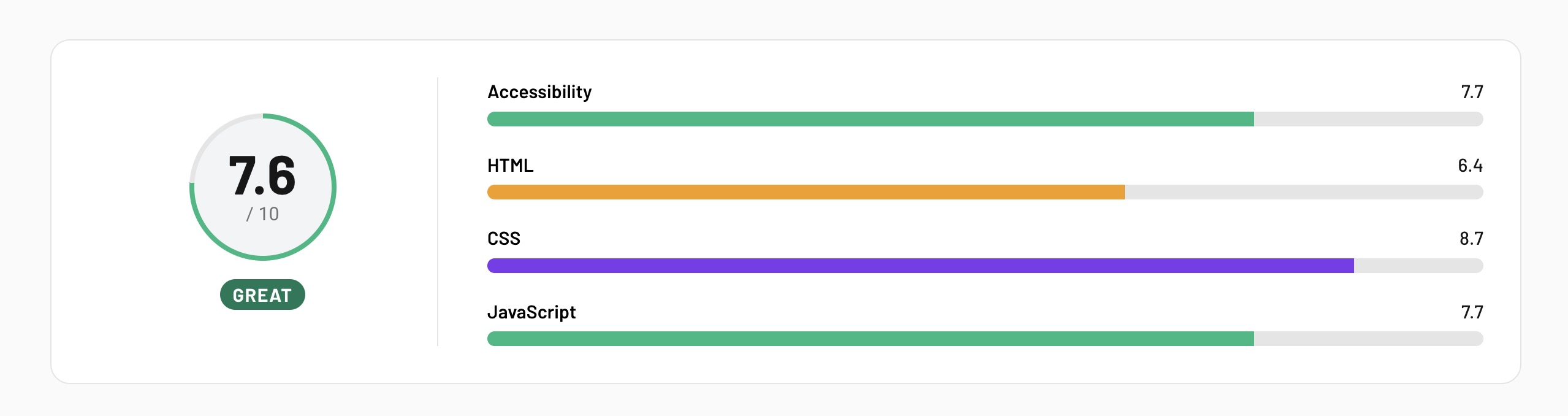
Scores are based on a combination of our static analysis tools (linters, validators, accessibility checkers) and AI review. The AI evaluates your code holistically and assigns a score within these bands:
- 90-100: Clean, well-organized code with no issues
- 80-89: Solid fundamentals with only minor suggestions
- 65-79: Good practices overall, with a few areas to improve
- 45-64: Notable quality gaps worth addressing
- 0-44: Fundamental issues that need attention
One thing I want to flag: scores are anchored to real findings. If our tools detect errors or warnings in your code, the score reflects that, regardless of how clean the rest looks. This keeps things consistent and fair. It's not an AI giving you an arbitrary number. It's grounded in what the tools actually find.
We've also upgraded to a reasoning model for AI analysis, which has improved the accuracy and consistency of feedback across all parts of the report. And while we were in there, we gave the report UI some subtle tweaks to improve the content hierarchy and make everything a little nicer to read.
Stay on the solution
Something I'm especially excited about is that I think scoring might change how people approach challenges on Frontend Mentor.
Right now, many people submit a solution, review the feedback, and move on to the next challenge. That makes sense! There's always something new to build. But some of the best learning happens when you stay with a project, review the feedback, and refactor. That's what professional developers do every day. They revisit, improve, iterate. It's a core skill, and it's hard to practice if you're always moving to the next thing.
With scores, you now have a clear signal for whether your improvements are working. Submit a solution, check your scores, dig into the issues, make changes, resubmit. If the score goes up, you know you're on the right track. That feedback loop is really valuable, and it's been hard to create before now.
This applies regardless of how you're writing your code, by the way. Whether you've handwritten every line or used AI to help, the output is what gets measured. The goal is the same for everyone: improving the quality of your code in your projects. Scores help you track that, regardless of your workflow.
What's coming next
This is the first in a series of improvements to our solution reports. We're going to be adding new scoring dimensions in the near term, and we're also working on features to help you gain deeper insights into your solutions.
One thing I'm particularly looking forward to is historical report scores, so you can look back and see how your scores have improved over time. Imagine finishing a challenge, refactoring it over a few iterations, and seeing the difference between your original report score and your current one. That kind of visibility is really motivating. Historical reports aren't ready yet, but scoring is the foundation that makes them possible.
We'll share more as these features come together.
Give it a go
Submit a solution (or regenerate a report on one you've already completed) and check out your scores. Pick the area with the lowest score, dig into the issues, and see if you can improve it.
I'd love to hear what you think. Drop your feedback in the Discord. Happy coding!
Take your skills to the next level
- AI-powered solution reviews
- 50+ portfolio-ready premium projects
- Professional Figma design files