

IP Tracker App Challenge using React

Solution retrospective
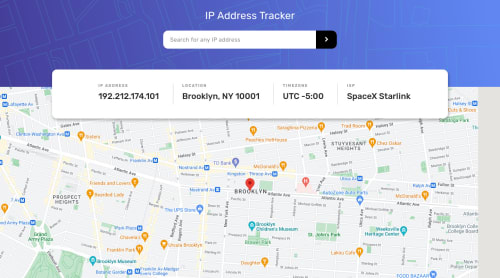
Here is my solution to the IP tracker challenge, completed with React. I used Ipify's API for geolocation and Google Maps API for displaying the map view. This was super fun and a great exercise for practicing using the native fetch function for API requests and transforming API response data into a custom object to save to state using React hooks. These state values would be passed to React components to display UI. For instance, receiving latitude and longitude from Ipify's API, and passing them as props to my Map component to use Google Map's API. I researched and read documentation for both API's and found Google Map's documentation a little difficult to follow at first, until I stumbled upon other resources. Overall, this was a good challenge and got to put into use CSS responsiveness, React functional components, fetching API data, regex, and more.
One thing that I am not sure if I did correctly is how to secure API keys. I created a .env file and saved both my API keys inside. Because my .env file is is my .gitignore file, I didn't have to hardcode my API keys inside my code. But from what I researched, in React apps, you can still access the keys and it's better to use a backend... for now, will continue to do more research on how to better secure keys.
Please log in to post a comment
Log in with GitHubCommunity feedback
No feedback yet. Be the first to give feedback on Kevin’s solution.

Join our Discord community
Join thousands of Frontend Mentor community members taking the challenges, sharing resources, helping each other, and chatting about all things front-end!
Join our Discord