

Multi-step form using Next js

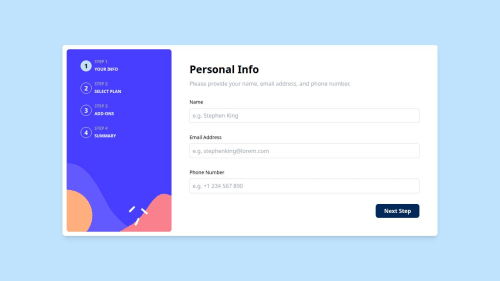
Solution retrospective
What are you most proud of?
-
Componentization and Reusability: "I am proud of having structured the project with reusable components, especially in a multi-step form, which improved the readability and maintainability of the code."
-
Responsiveness: "I was able to ensure a consistent and adaptable visual experience across different screen sizes, using Tailwind CSS and device detection."
-
Form Validation: "I applied efficient form validations, offering instant feedback to the user, which makes the interaction more intuitive and friendly."
-
Good practices and organization: "I followed typing standards with TypeScript and state management with React Hooks, improving the robustness and scalability of the project."
What would you do differently next time?
- Test implementation: "I would like to incorporate automated tests, such as Jest or React Testing Library, to ensure project consistency in possible future changes." Performance Optimization: "I would explore ways to optimize the loading of steps, perhaps using preloading or lazy loading techniques, to improve the user experience on slower connections."
- Accessibility Improvements: "I would pay more attention to accessibility, ensuring that all interactions are friendly to users with disabilities, especially when it comes to keyboard navigation and screen readers."
- Even more personalized visual feedback: "I might implement additional real-time visual feedback as the user completes the form, indicating progress or suggestions."
-
Multi-step form state management: "One of the biggest challenges was managing state across multiple form steps efficiently and in sync. I solved this by using React Hooks, allowing data to flow between components without state getting lost or causing unnecessary re-renders."
-
Cross-Device Responsiveness: "Making sure the form looked good on both mobile and desktop devices was challenging, especially in a multi-step layout. I was able to solve this by applying Tailwind CSS and creating a responsive state that senses the screen width, allowing for real-time adjustments."
-
Error Feedback and Field Validation: "Implementing user-friendly form validation was challenging, as I wanted to avoid cluttering the interface with error messages. I developed validation logic that highlights only the necessary fields, providing direct feedback without detracting from the user experience."
I am always open to feedback and suggestions on all areas of my project. If you have ideas on how to improve usability, optimize the code, enhance the aesthetics, or any other aspect, your contribution will be greatly appreciated! Feel free to share your experiences or tips, regardless of the specific area. Collaboration is essential for the continued growth and improvement of this project.
Thank you for your help!
Please log in to post a comment
Log in with GitHubCommunity feedback
No feedback yet. Be the first to give feedback on Anthony Marin’s solution.

Join our Discord community
Join thousands of Frontend Mentor community members taking the challenges, sharing resources, helping each other, and chatting about all things front-end!
Join our Discord