


New challenge: Build a group chat app
We've launched a new premium challenge: a real-time group chat app for clubs of friends, with channels, threads, presence, link previews, and a live guest club.

Table of contents
We've launched a new premium challenge: a group chat app. You'll build Usuals, a real-time messaging app for clubs of friends, like a Thursday run club, a crew that plays most nights, or a book club that can never agree on the next pick. It's a Guru-level Product Challenge, so there's no Figma file. You make the design decisions and ship a real, deployed product.
Clubs usually run on group chats that weren't built for them, where the meeting point gets buried under 200 messages. In Usuals, a channel's next meet-up stays pinned above the messages, with who's going. The guest club is alive, too. Visitors land in Lockside Runners 45 minutes before its run, and while they look around, members come online, type, reply in threads, and say they're going.
Our most ambitious challenge yet
This is the biggest product spec we've written, and probably the hardest build we've published. It's full stack, with real-time messaging, privacy rules that reach every part of the app, and a guest club that runs without touching your database. There's no design file to follow, either. The build order splits it into seven stages, each ending in something you can demo, and the README shows you how to make it smaller if you need to.
It's a proper project to get your teeth into. If you're looking for your first role, it's a big build you can show and talk through. If you're already working, it's a sizeable project to build alongside AI agents. If you manage a team, it's a good practice project to hand a junior developer, and the finished app could even run some light internal chat.
What you'll build
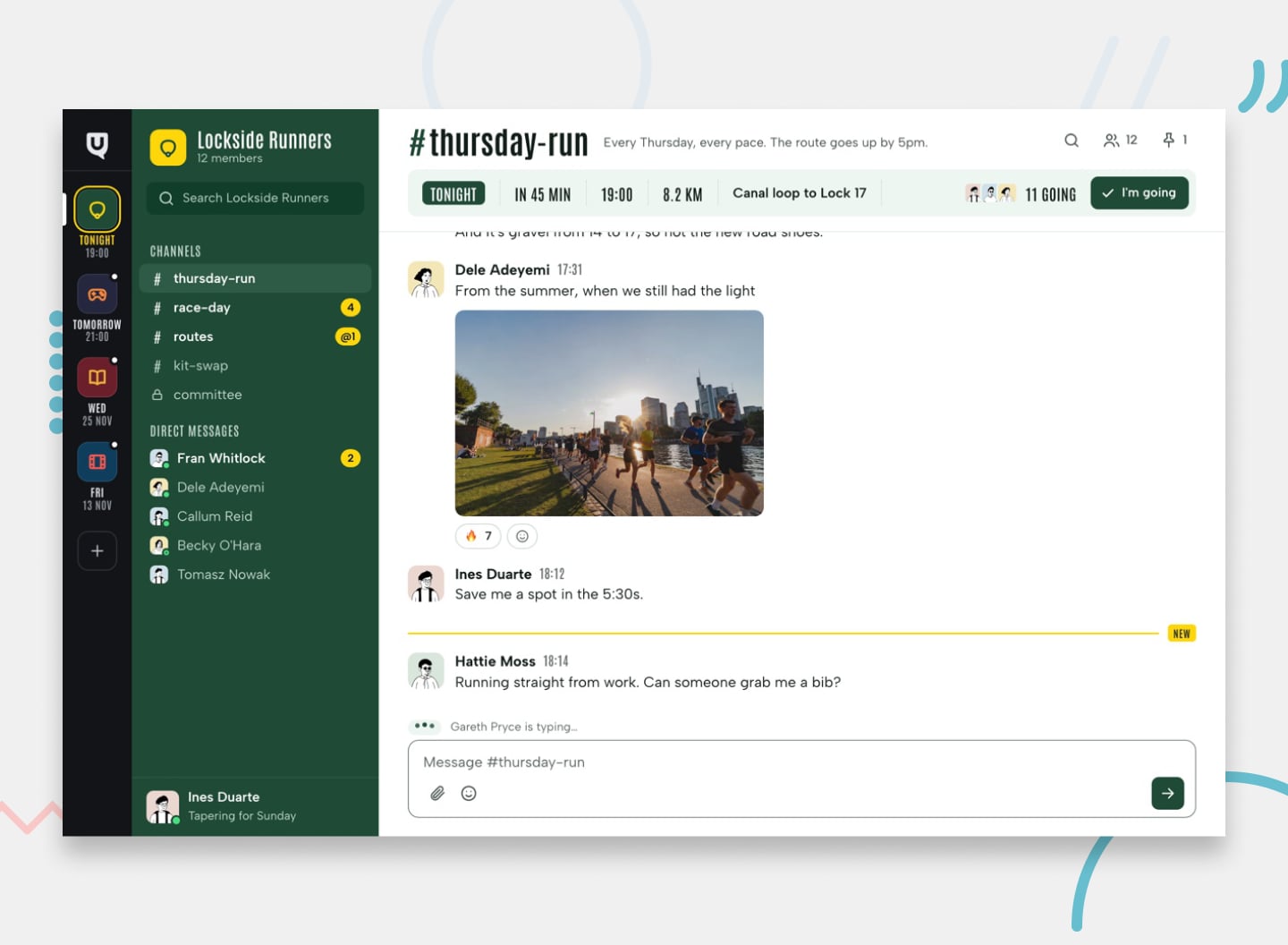
Usuals has 13 Core features. The main pieces are:
- Accounts, and clubs with their own colors that friends join by invite link
- Public and private channels, plus direct messages
- Real-time messaging with optimistic sends, reconnecting without gaps or duplicates, and unread counts that stay right
- A next meet-up in its channel, with a one-tap RSVP and the list of who's going
- Presence and typing, emoji reactions, and photos
- Link previews fetched by your server
- Search across every message a member is allowed to see
- A landing page with a live guest club
Three features come without a spec: the threading model, how people move between clubs and channels on a phone, and notification controls. You design those yourself and write up what you decided.
Link previews are the external integration. They need no API key, but they bring a real security problem. Your server fetches pages it doesn't control, so it has to refuse addresses on its own network. The technical requirements walk you through the checks, with a link to OWASP's SSRF Prevention Cheat Sheet. Avatars come from DiceBear, which is free and keyless.
What's included
The starter gives you everything except the design file:
- A full spec: the product definition, 22 features (13 Core and 9 Stretch) with acceptance criteria, three design challenges, technical requirements, and six optional differentiators
- A build order in seven stages, each ending in something you can demo on your live URL, and a checklist to run on your live app before you submit
DESIGN.md, a design system for you and your coding agent, with starter CSS tokens, an optional Tailwind v4 config, and the Usuals logo. Each club's colors come from two tokens. Use it as it is, change it, or delete it and start your own- UI/UX guidance and a WCAG 2.2 AA accessibility checklist
- Sample data for four clubs and a script of live activity for the guest club, each with a JSON Schema
AGENTS.mdandCLAUDE.md, so coding agents understand the whole project
Two ways to build it
We recommend building it full stack, with a database, authentication, and a real-time service. Guests get their own copy of the club in the browser, and nothing they do is saved. Everything Core needs can run on free tiers.
If you'd like to focus on the frontend, the spec has a frontend-only path, with its own checks for every stage. The app opens straight into the sample club, a server you simulate in the browser plays the live activity, and what you post stays in the browser. You still deploy it, to Vercel or Netlify, which run the one serverless function link previews need.
What you'll practice
- Real-time architecture: optimistic sends that reconcile with the server, presence and typing, and reconnecting without gaps or duplicates
- Modeling clubs, channels, threads, reactions, read state, and RSVPs, with privacy running through all of it
- Keeping unread counts right across channels, DMs, and devices
- One data layer that serves members and guests, so the guest club works without touching your database
- Fetching pages you don't control safely on the server
- Keeping long conversations smooth with cursor-based pagination
- Building a themeable design system where every club's colors stay accessible
- Designing product features from a brief, with no mockup to follow
How to start
Head to the challenge page, download the starter, and read the README. The build order in spec/milestones.md starts with a walking skeleton, an app deployed on day one with the first scripted guest events playing through your real-time layer.
These challenges are designed for AI collaboration, so lean on AI across planning, building, and polishing. DESIGN.md gives your coding agent the design system from the first component. The product and design decisions are still yours.
Ship something real
Product Challenges end with a live URL. Once yours passes the checks, the README suggests inviting a real group, like your run club or a few friends, to use it for a week. They'll find things like the meet-up nobody could find or the notification that came at 2am. Write up what they used and what broke in your README's Real Use section.
Some ideas to test yourself
- Add an AI agent to each club that members can mention, then give it more tools, through MCP if you like
- Let clubs choose any colors, with contrast checked as they pick, and finish dark mode
- Give each channel shared notes that several people can edit at once
- Write end-to-end tests where two browsers watch each other's messages arrive
- Make the app installable and readable offline, with messages queued until the signal returns
- Pin important messages and save others to come back to
- Build native mobile apps on the same backend
Join the community
Share your progress in our Discord community, ask for help when the real-time layer misbehaves, and post your deployed app in the #finished-projects channel.
Take your skills further
Usuals is a premium challenge, so the starter code comes with a Pro membership. If you're not a Pro member yet, you can find out more at frontendmentor.io/pro.
Happy coding!
Get feedback on every solution
- AI code review on every solution
- Re-run reviews as often as you like
- Premium projects and Figma design files