


New challenge: Build a hotel booking confirmation page
We've launched a new free challenge: a boutique hotel booking confirmation page. A junior-level project focused on responsive layout, with some nice details to take further.

Table of contents
We've launched a new free challenge: a hotel booking confirmation page. You'll build the confirmation screen a guest sees after booking a stay at Maison Soleil, a fictional boutique hotel on the French coast. It's a junior-level project that will help you improve your HTML and CSS fundamentals, like responsive design, layout, and adding details like transitions.
What you'll build
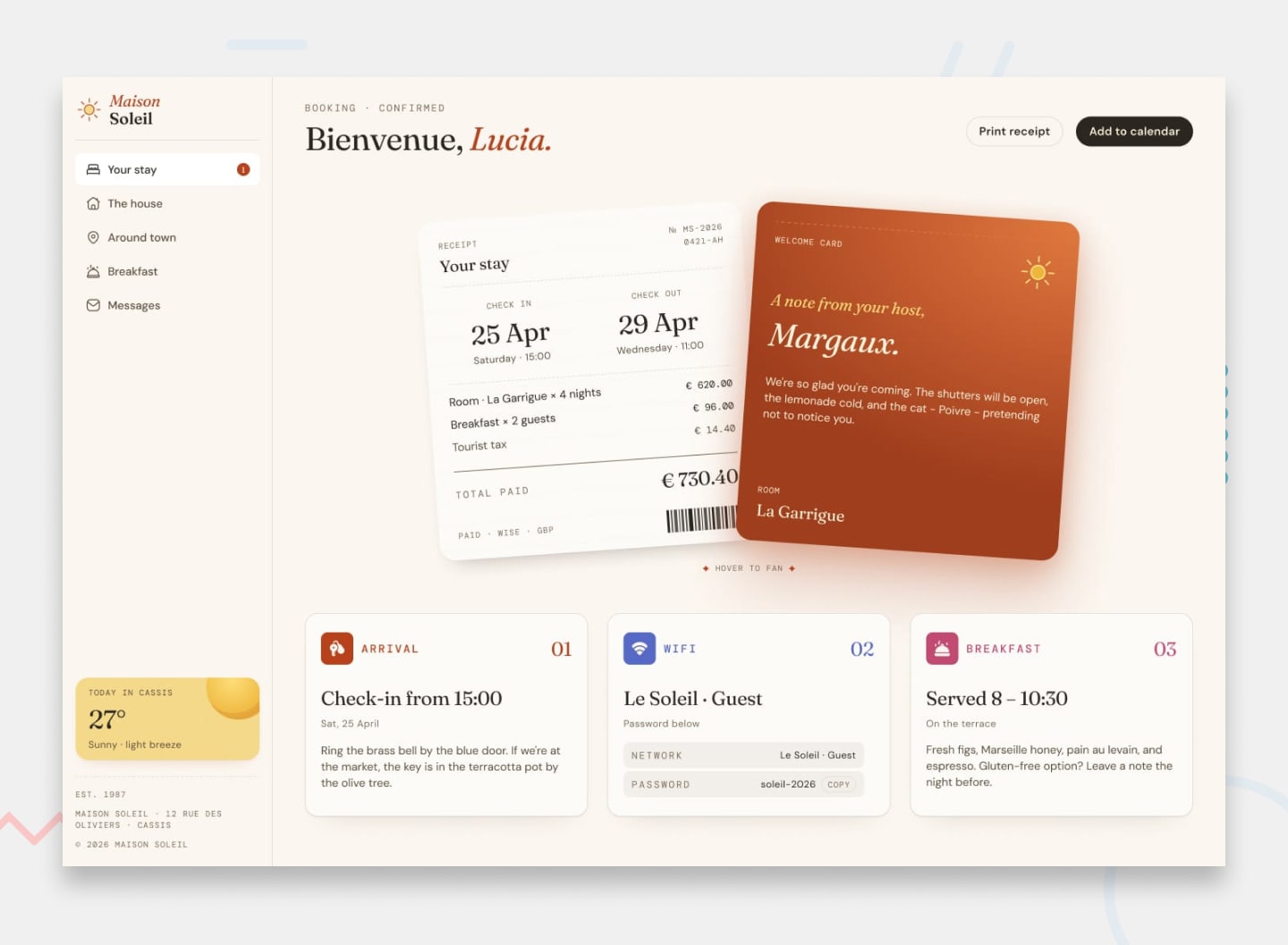
The page sits a branded sidebar next to a stack of overlapping cards, so there's plenty to sink your teeth into:
- A printed-style receipt card with the booking summary and totals
- A welcome note from the guest's host, layered over the receipt
- A row of detail cards for arrival, Wi-Fi, and breakfast
- A sidebar with the hotel branding, navigation, and a local weather widget
- A responsive layout that adapts from desktop down to mobile
What's included
This is a free challenge, so the starter code gives you everything you need to build without a Figma file:
- Design screenshots for desktop, mobile, and the active (hover and focus) states
- A style guide with the colors, fonts, and font sizes
- The fonts (Fraunces, DM Sans, and DM Mono), plus all the icons and images
- A starter HTML file with the content already written out for you
What you'll practice
It's a focused project for some core frontend skills:
- Building a responsive, multi-column layout
- Creating depth and hierarchy with overlapping, layered cards
- Working with a three-typeface system: serif, sans-serif, and monospace
- Styling print-inspired details like the receipt and barcode
- Adding accessible hover and focus states for every interactive element
How to start
Head to the challenge page, download the starter code, and read through the README. It lists the user stories and a few ideas for taking the project further. From there, it's over to you.
If AI tools are part of your workflow, lean on them to understand concepts and review your code, not to generate code. You'll learn far more by writing the solution yourself.
Some ideas to test yourself
Once you've matched the design, here are a few ways to push the project further:
- Add a working copy button so guests can copy the Wi-Fi password in one click
- Make the sidebar collapse into a toggleable menu on smaller screens
- Animate the receipt and host-note cards so they fan out on hover
- Open a clean print view for the receipt using the browser's print dialog
- Generate an "Add to calendar" file from the stay dates
Join the community
Building alongside other people makes a real difference. Share your progress in our Discord community, ask for feedback on your solution, and see how others approached the same design. We'd love to see what you build.
Take your skills further
If you enjoy this one, our premium challenges go further with multi-page builds, real APIs, and full Figma design files. Whatever you pick next, we hope you're enjoying our challenges to build your skills.
Happy coding!
Take your skills to the next level
- AI-powered solution reviews
- 50+ portfolio-ready premium projects
- Professional Figma design files