

Submitted 10 months agoA solution to the Social proof section challenge
A responsive social proof section on a landing page
pure-css

@lutfiismail52
Solution retrospective
What specific areas of your project would you like help with?
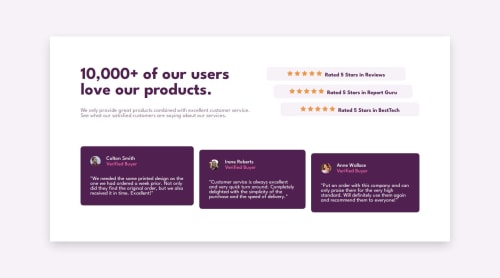
Is my way of positioning the testimonial and rating sections correct using the CSS property position: relative;. Maybe there is a better and more efficient way? Here is more or less an example of my code:
<div class="top-section-ratings">
 <div class="rating">
   <div class="rating-starts">
     <img src="./images/icon-star.svg" alt="star icon">
     <img src="./images/icon-star.svg" alt="star icon">
     <img src="./images/icon-star.svg" alt="star icon">
     <img src="./images/icon-star.svg" alt="star icon">
     <img src="./images/icon-star.svg" alt="star icon">
   </div>
 <p class="rating-text">Rated 5 Stars in Reviews</p>
 </div>
 </div>
 </section>

 <!-- Testimonials Section -->
 <section class="testimonials">
   <div class="testimonial">
     <div class="testimonial-header">
     <img class="testimonial-image" src="./images/image-colton.jpg" alt="Colton Smith">
     <div class="testimonial-user">
       <p class="testimonial-name">Colton Smith</p>
       <p class="testimonial-role">Verified Buyer</p>
     </div>
   </div>
   <p class="testimonial-text">
 "We needed the same printed design as the one we had ordered a week before.
 Not only did they find the original order, but we also received it in time.
 Excellent!"
 </p>
 </div>
@media screen and (min-width: 768px) {
 .top-section-ratings> :nth-child(1) {
 position: relative;
 left: -40px;
 }

 .top-section-ratings> :nth-child(2) {
 position: relative;
 left: -20px;
 }

 .rating {
 width: 400px;
 flex-direction: row;
 justify-content: center;
 align-items: center;
 gap: 8px;
 }

 .testimonials {
 display: flex;
 gap: 16px;
 }

 .testimonials> :nth-child(2) {
 position: relative;
 top: 10px;
 }

 .testimonials> :nth-child(3) {
position: relative;
top: 20px;
}
}
Thank you for taking the time to help me with this question, I really appreciate it! 😊
Code
Loading...
Please log in to post a comment
Log in with GitHubCommunity feedback
No feedback yet. Be the first to give feedback on Lutfi Ismail's solution.

Join our Discord community
Join thousands of Frontend Mentor community members taking the challenges, sharing resources, helping each other, and chatting about all things front-end!
Join our Discord