

I used HTML, CSS, JavaScript, VS Code, GitHub, and Flexbox in project.

Solution retrospective
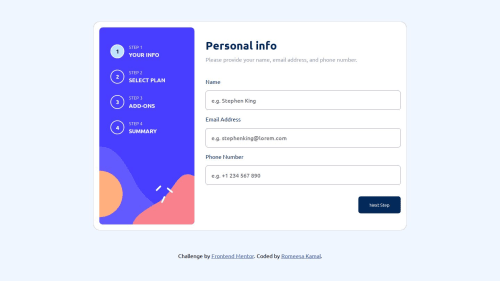
What I’m most proud of: I’m proud of successfully implementing a user-friendly multi-step form with clear navigation and validation. Each step guides the user seamlessly, ensuring they don’t feel overwhelmed with too much information at once. Progress indicators helped enhance the user experience, providing clarity on their completion status.
What I’d do differently next time: Next time, I’d focus on optimizing the backend for better performance, particularly with data validation across steps. Additionally, I’d conduct more extensive user testing to identify any potential pain points and ensure accessibility compliance for users with diverse needs.
What challenges did you encounter, and how did you overcome them?While building the multi-step form, one of the major challenges was ensuring seamless navigation between steps, especially when users wanted to go back to a previous step without losing entered data. Another challenge was managing validation dynamically for each step, ensuring errors were highlighted in real-time without disrupting the user experience.
How I Overcame Them: To address the navigation issue, I implemented a state management solution that preserved user input as they moved between steps. For validation, I used a step-specific validation library that triggered only when users attempted to proceed to the next step. Additionally, thorough testing with sample data and real users helped me refine the workflow and iron out any usability issues.
What specific areas of your project would you like help with?If you're working on a multi-step form project, here are some specific areas where you might need help:
State Management: How to efficiently manage and preserve user data across steps, especially for complex forms.
Validation Logic: Setting up dynamic validation rules for each step and ensuring smooth error handling without interrupting the user experience.
User Experience (UX): Designing a clear progress indicator and ensuring navigation between steps is intuitive and user-friendly.
Responsive Design: Ensuring the form works seamlessly across different devices and screen sizes.
API Integration: Handling form submissions with an API, including managing errors and ensuring data security during the process.
Accessibility: Making the form accessible to users with disabilities, including keyboard navigation and screen reader support.
Testing and Debugging: Setting up automated tests or tools to catch bugs and usability issues before launch.
Please log in to post a comment
Log in with GitHubCommunity feedback
No feedback yet. Be the first to give feedback on RomeesaKamal's solution.

Join our Discord community
Join thousands of Frontend Mentor community members taking the challenges, sharing resources, helping each other, and chatting about all things front-end!
Join our Discord