

Interactive Comments with Firebase Auth Login

Solution retrospective
Any feedback is welcome!
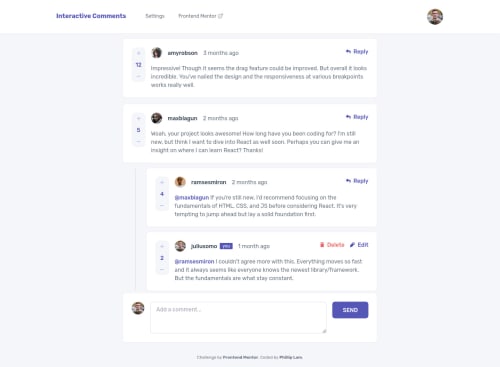
This was a fun but tough challenge... especially when trying to create reusable components for the comments with their nested replies.
Problem
Something I've been struggling to fix is a NextJS + localStorage related issue. I wanted to store the user preferences for Dark/Light mode in localStorage, however since NextJS does server side rendering, it will not see the user's preferences initially before the page renders, and will use the default theme value.
- Example Test Case : User chooses Dark Mode -> refreshes page
- NextJS will take the default theme state (Light Mode) and show light mode briefly
- After client side loads, app will check local storage (client side storage), and change to Dark Mode
- This causes a brief "flickering" effect :(
Extra fun stuff: I reused the nav component design from the e-Commerce Product Page Frontend Mentor challenge and added some more features:
- Ability to swap demo users from the design mockup
- Ability to sign in with a live user using Firebase Auth (with providers for Google, Twitter, Github)
- Dark/Light Mode
- Skeleton Loading
- Timestamp updates when user edits comment
- Popover revealed when user hovers over the edited timestamp
As a next step...
connecting to a live database would be fun! I was originally thinking of using the Firebase Realtime database and even flattened the JSON file provided to prepare for this... but for the sake of a demo site that publicly available, I chose to store all comments on localStorage for now so that nothing sensitive can be submitted.
Please log in to post a comment
Log in with GitHubCommunity feedback
No feedback yet. Be the first to give feedback on Phillip's solution.

Join our Discord community
Join thousands of Frontend Mentor community members taking the challenges, sharing resources, helping each other, and chatting about all things front-end!
Join our Discord