

Multi-step form

Solution retrospective
Project Journal - Multi-Step Form
I decided to document this challenge for personal use and share it with fellow developers. I spend just a few hours a day, but I hope to monitor time more to understand how long each challenge takes. It helps a lot to understand the challenges, see patterns to understand what to improve, and partly show the thinking process. 😅 I
✅ Day 1: Project Setup & Basic Navigation
What did I work on today?
- Set up the project with Vite + React template.
- Created the step navigation sidebar using react-router-dom.
- Started implementing switching between steps using routes and aligning it with the Go Back / Next Step buttons.
- Did only few lines of CSS and decided to implement functionality first.
Why did I make this decision?
- Chose React to practice basic concepts again.
- I also wanted to practise React Context to manage global form state — I don’t often use it, so it’s a good opportunity to practice. I'm still not sure if it’s the most necessary solution, but it's helping with flexibility.
- Completely ignored adding any styling which usually annoys me but I am re-teaching myself that it’s better to make the functionality first and polish the design later.
✅ Day 2: Form Implementation & State Persistence
What did I work on today?
- Added full forms to each route/step.
- Implemented validation for each input.
- Made sure that form data is preserved even if the route changes.
- Added functionality to prevent accidental refresh if form is partially filled, to protect user progress.
Why did I make this decision?
- I want the user to have a smooth experience and not lose their data during navigation.
- Practicing data persistence and validation is crucial for form-heavy apps.
✅ Day 3: Finalizing Project
What did I work on today?
- Added checked attribute to plan radio buttons and billing checkbox.
- Added international phone number library to enhance phone number validation. You can find it here.
- Removed routing and added state to change the form steps so that it works for the navigation and back/next buttons.
Why did I make this decision?
- When changing steps, the chosen plan/billing was saved in the form but didn’t persist visually. I added styles to show the chosen options visually.
- I wanted better number validation but didn’t want to create a huge logic manually, so I decided to choose a library. I have never used any external phone number validation before. I think it was fun and saved a lot of time.
- Even though the project has no context, it made more sense not to use routing for every step in the form—simply change the state and render the corresponding step.
✅ Day 1: Project Setup & Basic Navigation
What was difficult or confusing?
- I didn’t create any wireframes or structure plan, so as I built features, I was unsure if the structure matched the project goals.
- It was tricky to think about how to sync sidebar-based routing with form step navigation logic (Next / Go Back).
How did I fix the problem?
- I used React Context to avoid prop-drilling and give myself flexibility to restructure components later.
- Still working on aligning route changes with form progress logic.
✅ Day 2: Form Implementation & State Persistence
What was difficult or confusing?
- I didn’t plan the overall data structure ahead of time, so deciding how to calculate totals after the form was filled was unclear.
- It was unclear how to block users from jumping ahead to the next step from the sidebar if the current step is incomplete.
How did I fix the problem?
- I haven’t solved the navigation validation logic yet.
- For pricing, I used useMemo() to calculate totals based on form selections and it’s very convenient as it will be recalculated as the form state changes.
- Instead of grouping prices by plans, I grouped them under monthly/yearly billing, then matched those with user choices. Still not sure it’s the best decision but it’s working!
✅ Day 3: Finalizing Project
What was difficult or confusing?
- It took me longer than needed to improve validation for the number input, as it’s a custom component and has a slightly different structure.
- When users interact with checkboxes or radio buttons, the design doesn’t show the native radio button and also uses a custom checkbox with a different color. I was unsure how to achieve this with the least amount of CSS and conditional classes.
How did I fix the problem?
- Inspected the structure, read the docs in more detail, and added validation.
- I visually hid the checkbox/radio buttons but made the entire container clickable so that the user actually selects the input. I’m still not sure whether it’s the best approach, but it works.
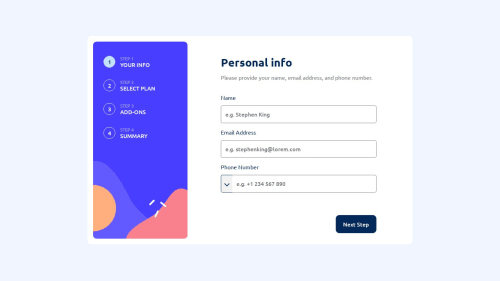
The best color choice for title paragraphs (e.g. "Please provide your name, email address, and phone number.") from the provided colors was Gray 500, however, this color choice doesn't pass the accessibility check, as it doesn't have enough contrast - "Background and foreground colors do not have a sufficient contrast ratio.". That's why I had to make it slightly darker on purpose. What are your thoughts about this?
Please log in to post a comment
Log in with GitHubCommunity feedback
No feedback yet. Be the first to give feedback on 👾 Ekaterine Mitagvaria 👾’s solution.

Join our Discord community
Join thousands of Frontend Mentor community members taking the challenges, sharing resources, helping each other, and chatting about all things front-end!
Join our Discord