

Submitted about 2 years agoA solution to the Interactive card details form challenge
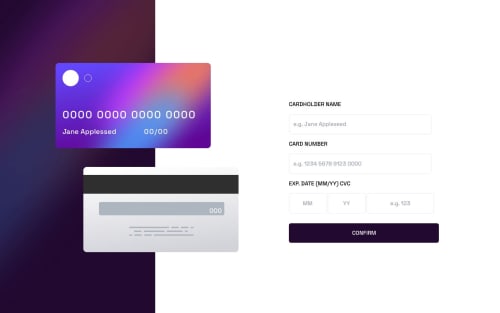
Responsive details card form using tailwind css
tailwind-css

@ratul0407
Solution retrospective
Hello everyone👋👋 this my solution for the interactive card details form🚀🚀
Things that I've learned:
- I've learned lots of dom manipulation techniques✨✨
- I've learned a lot about how the input fields✨
- How to insert spaces programmatically in an input field⚙⚙
- How to make the max-length attribute work on input fields with a type of number✔✔, which doesn't work by default.
- I learned a few things about regular expression and how we can add then into the javascript.🚀🚀
Question:
- I am not that good at javascript as I am still learning the language and this was the first time that I've took time to make this kind of project which requires a lot of dom manipulation. So, I'm not very confident the way I wrote my Javascript code. Especially the way I manipulated elements in my javascript code. So I'm looking forward to have a review from you on my dom manipulation and How I can improve it🌝🌝.
- Secondly I want to know if there was a better way for me to place all those texts on the images (the back and front card img).👍👍 I used
position: relativeon the cards and then placed the texts usingposition: absolute. Is there a better way to do it?
frameworks used: Tailwind CSS🚀🚀
Follow me to be a part on my journey on completing all of the free frontend mentor challenges🎉🎉✨
Code
Loading...
Please log in to post a comment
Log in with GitHubCommunity feedback
No feedback yet. Be the first to give feedback on Rajaul Islam Ratul's solution.

Join our Discord community
Join thousands of Frontend Mentor community members taking the challenges, sharing resources, helping each other, and chatting about all things front-end!
Join our Discord