

Tech conference site

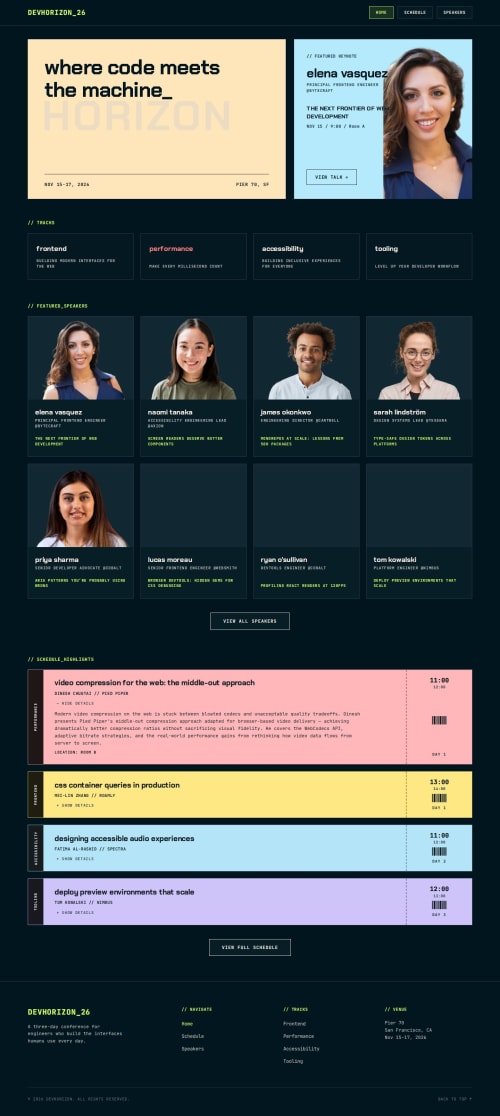
Solution retrospective
I've noticed that companies increasingly expect developers to integrate AI into their workflow. With that in mind, I built this challenge using free AI tools with minimal manual hands-on work.
Additionally, instead of using Next.js, Astro, or another modern framework, I chose WordPress because I touched this CMS a few years ago, and as developers, we often can't choose the exact technology we desire for every project.
What I used:
- I used Google AI Studio to generate the raw HTML and CSS for the three pages. I tried other tools first, but struggled to get both the full HTML/CSS and the design layout right.
- Opencode with DeepSeek helped me convert those HTML and CSS files into a functional WordPress template. It generated the plan and the README. Since security is extremely important, I also audited and tested the generated template for any potential errors.
What I would do differently next time:
- Next time, I would like to experiment with a wider variety of AI tools to compare their code quality and efficiency for CMS integration.
-
Generating complete HTML and CSS from design images: Initially, I tried using Google Stitch, but its primary focus is design generation, and I quickly hit token limits. I switched to Google AI Studio, which handled token limits much better. While it couldn't output the raw HTML/CSS immediately in one go, I overcame this by having it generate a React project first, which I then used to build and extract the full HTML and CSS files.
-
Converting to a WordPress template with OpenCode: Crafting the right prompts for OpenCode to generate a proper WordPress theme was a trial-and-error process. I needed it to handle Custom Post Types (CPT), structure data imports, generate a complete README.md with setup instructions, and perform a security/bug audit on the generated theme code.
-
AWS Free Tier Deployment & Free HTTPS Security: Deploying the site required setting up and connecting an Amazon EC2 instance (Ubuntu Server) running Apache/PHP with a decoupled Amazon RDS MySQL database, configuring network security groups, and troubleshooting server routing rules like mod_rewrite for WordPress permalinks. Additionally, since direct IP SSL is not supported, I researched how to implement free HTTPS and chose DuckDNS for its ease of use to set up a free domain, combined with Certbot and Let's Encrypt to secure the site.
I know the template isn't 100% pixel-perfect, as I took some creative liberties since my primary focus for this challenge was experimenting with AI-driven workflows.
Because of that, any suggestions regarding AI tools, prompt engineering strategies, or smoother end-to-end workflows to make the design-to-code process more fluid would be more than welcome!
Please log in to post a comment
Log in with GitHubCommunity feedback
No feedback yet. Be the first to give feedback on BarrieDirk’s solution.

Join our Discord community
Join thousands of Frontend Mentor community members taking the challenges, sharing resources, helping each other, and chatting about all things front-end!
Join our Discord