

tip calculator developed by Ariel Yamien

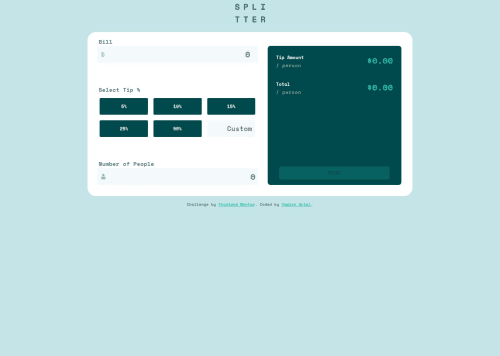
Solution retrospective
I'm most proud of how I managed to refactor my JavaScript code into small, reusable, and readable functions. It really improved the clarity and maintainability of my code. I also made sure to follow a mobile-first approach and handle form validation properly with clear feedback for the user.
If I had to do it differently next time, I would separate my logic into multiple JavaScript modules from the start, to make the project even more scalable and organized. I’d also consider implementing unit tests.
What challenges did you encounter, and how did you overcome them?One of the main challenges I faced was managing form validation and error feedback without making the code messy or repetitive. At first, I was duplicating logic across several event listeners. To overcome this, I refactored my code by creating reusable functions like recupererValeurInput() and verifierChamp() to keep things clean and modular.
Another challenge was handling responsive design properly. I followed a mobile-first approach and then used media queries to adjust the layout for larger screens, making sure everything looked good at each breakpoint.
I also had to ensure that all user interactions were intuitive — like showing real-time error messages and enabling/disabling the reset button dynamically. I used a combination of condition checks and helper functions to solve these issues effectively.
What specific areas of your project would you like help with?I would appreciate feedback on the following areas:
JavaScript code structure: Are there ways I could improve the organization of my functions or reduce coupling between logic and DOM manipulation?

Form validation: Does my current validation logic follow best practices for maintainability and accessibility?

Responsive design: I used a mobile-first approach and added a desktop layout using media queries — is my implementation flexible enough for all screen sizes?

CSS structure and naming conventions: I used BEM-like class naming in French — is this clear and consistent for others to read and maintain?
Any suggestions on how to further improve clarity, modularity, or performance are very welcome!
Please log in to post a comment
Log in with GitHubCommunity feedback
No feedback yet. Be the first to give feedback on Yamien Ariel's solution.

Join our Discord community
Join thousands of Frontend Mentor community members taking the challenges, sharing resources, helping each other, and chatting about all things front-end!
Join our Discord