

URL shortening with dropdown hamburger nav on smaller screens

Solution retrospective
I'm happy I was able to make the site function with minimal help, make it accesible to screen readers and learned a lot about CORS access and SEO standards.
Im happy I was able to use flexbox to align the remove X button in my links card at first I used absolute positioning but I am trying to learn to stay away from that unless absolutely necessary.
What challenges did you encounter, and how did you overcome them?I ran into an issue with the URLs being denied access due to CORS I asked chatGPT how to solve this and it told me to write a function to use CORS anywhere for testing which I did in my local development. I then removed that function and ran into another issue with it not working on netlify so I again asked ChatGPT how to solve this issue and it taught me about netlify server less functions to be able to access cleanuri API properly due to CORS.
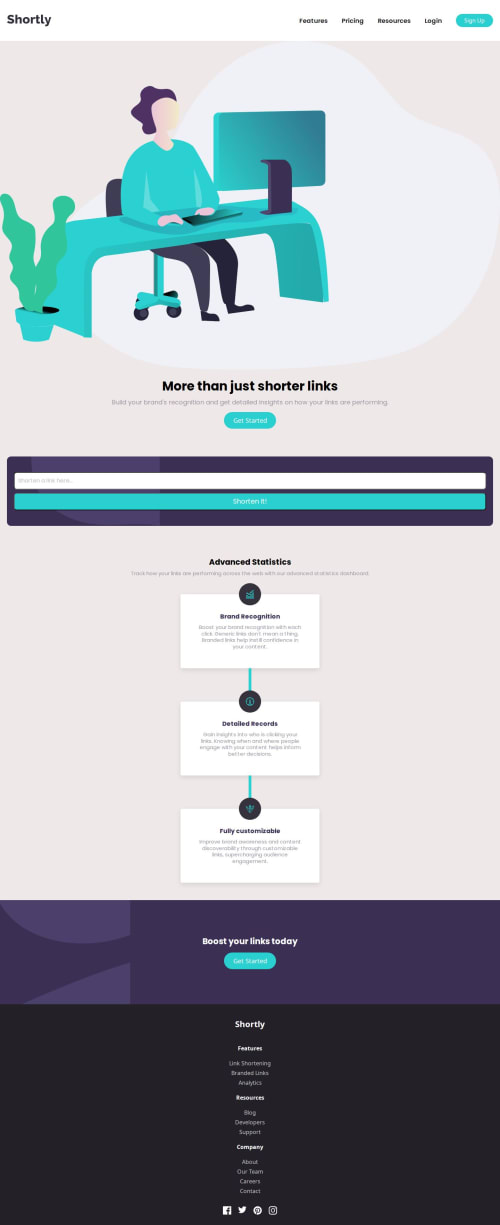
I also ran into an issue with the verical blue lines using the after psuedo class between the different cards. They were overlapping the cards so I asked chatgpt how to solve this and it suggested using z index to hide the lines behind the cards. I applied this to my code setting a higher z index on the card and a lower z index on the psuedo class to achieve the desired visuals I want.
The last issue I ran into was checking if the URL was valid to display the error message if it wasn't. I used a combination of reddit stackoverflow and chatgpt to teach myself how to solve this issue. Chatgpt wrote me messy code to deal with this issue and I used that boilerplate to write my own function to fix it.
What specific areas of your project would you like help with?I would like help with naming conventions i feel like my function and class names may not follow any standards which are used in the professional field. I have heard about BEM but have not yet learned or used it. I do not know how clear my code reads to someone coming into my project with fresh eyes.
I also do not think my css is organized well, I tried to keep it structured in a way where the classes are organized in the order which they appear on the page but somewhere in the middle I started adding new classes and it got messy quickly. I would like advice on how you deal with a growing css file. Do you split it into separate css files ? Should I maybe learn and use sass/scss? Any advice in making the code more eligible would be great.
I also barely used utility classes so there I'd a bunch of reused code especially for margins and padding. Would you tackle this issue by using a framework or would a framework be too much for a project this small and instead I should write my own custom helper classes ?
Please log in to post a comment
Log in with GitHubCommunity feedback
No feedback yet. Be the first to give feedback on feelgooddd's solution.

Join our Discord community
Join thousands of Frontend Mentor community members taking the challenges, sharing resources, helping each other, and chatting about all things front-end!
Join our Discord