

Responsive Time Tracking Dashboard w/ NextJS/TailwindCSS/TypeScript

Solution retrospective
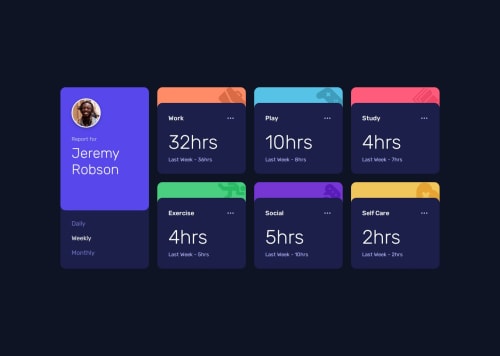
I particularly liked working on the timeframe display cards and how they needed to have a different background color and image.
One thing I might do differently next time is replicate the positioning of the background images more exactly rather than simply relying on tailwinds bg-top-right.
I got a bit stumped for a second around how to get the circular image to have a circular border rather than a square border.
My original inclination was to create an SVG and layer that on top, or to create a div with a border and no bg to, again, layer on top of the image. This could have worked although would be completely unnecessary.
Instead of eventually realized that I could simply add a surrounding div to the image, which I had to do anyways to get the image to resize across media query breakpoints. And just add a border to the div. This wasn't intuitive to me at first since I knew it's border would just be square.
However, once I added the tailwind class rounded-full it was indeed a circle and had the 3 pixel border I wanted it to.
Sometimes the easiest solution to think of isn't the easiest solution to implement. In this case I thought of several naive ways to do it before coming up with the better way.
If I wasn't using the NextJS <Image /> component, then I could have done it without even needing the surrounding <div>.
Semantic HTML usage is what I primarily need advice on here. And potentially project source organization, when it comes to the component structure I ended up using. I could potentially break up some of the larger components into sub-components.
Please log in to post a comment
Log in with GitHubCommunity feedback
No feedback yet. Be the first to give feedback on Erik S. Carlsten's solution.

Join our Discord community
Join thousands of Frontend Mentor community members taking the challenges, sharing resources, helping each other, and chatting about all things front-end!
Join our Discord